Quest 04

A Tea Mug in 256 Pixels
Every picture on this site is drawn by hand on a grid. The icons are sixteen pixels by sixteen: 256 squares, each one either a color or nothing. That sounds like very little room, and it is. It’s also a surprising number of decisions. Here is how one of them happened: the tea mug that lives in my Inventory.

Silhouette first
Before any color, I fill the shape with a single flat tone and look at it at actual size. If the silhouette doesn’t read as a mug when it’s tiny and gray, no amount of shading will save it.
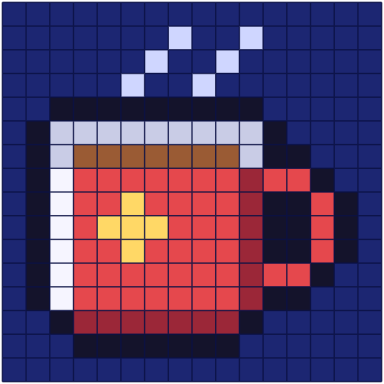
The body of this mug is nine pixels wide, and the handle adds three more on the right. The handle is a loop: a two-pixel stub at the top, a three-pixel bar down the side, another stub at the bottom. My first version had a handle two pixels thick all the way round, which at actual size looked like a second, smaller mug glued to the first.
Pick the palette before you need it
All the icons here share one small palette of about twenty colors, so the keyboard, the cartridge and the mug look like they belong to the same world. The mug uses seven of those colors, plus the outline:
- Mug body
#e5484d - Shadow side
#9b2738 - Highlight
#f6f5ff - Rim
#c9cce6 - Tea
#9a5b34 - Star
#ffd866 - Steam
#cfd6ff - Outline
#14132b
Consoles of that era worked the same way, only stricter. The Super Nintendo could show colors from a range of 32,768, but each sprite palette held sixteen entries, and one of those sixteen meant “transparent”. Artists spent whole careers deciding which fifteen colors a character got to keep. Choosing the palette first isn’t a limitation you put up with; it’s half of the design.
Decide where the light is
Every icon on this site is lit from the top left. So the mug gets a single column of near-white along its left edge, a column of darker red down its right edge, and a darker row along the bottom where it curves away from the light.
The classic beginner mistake — I made it for years — is pillow shading: darkening every edge and lightening the middle, as if the object glowed from inside. It looks puffy, and it looks wrong. One light source, applied consistently, does more than any number of extra colors.
The little yellow star on the side is five pixels in a plus shape. I tried a heart first. At actual size it read as a smudge of ketchup.
The outline, and the hole in the handle
The outline is a very dark navy rather than pure black. Black outlines look like holes cut in the screen; a dark, slightly blue outline sits comfortably on the window background and lets the colors beside it stay warm.
Here is my favorite part. The hole in the handle is just transparent pixels, two wide and three tall, and when the outline is drawn around the whole shape it fills that hole completely. No extra drawing needed. At actual size, that small dark block is what tells your eye you could put a finger through it. Remove it and the handle turns into a solid red lump.
Steam, and knowing when to stop
The steam is the only part of any icon here without an outline. Outlined steam looks like a solid object hovering over the cup; without one, it reads as something light and temporary. It’s two thin wisps, each three pixels tall, stepping one pixel at a time so the diagonal stays clean. The first draft had three wisps and looked like a cartoon about an angry hot drink.
Clean diagonals are one of those rules that sound fussy until you see them broken. A line that steps one-one-one looks smooth; one that steps one-two-one looks like a mistake, because it is one. Those stray steps are called jaggies, and hunting them down is most of the polishing.
Tricks that helped
- Look at it at actual size, often. Zoomed in, everything looks fine. The truth is at 1×.
- Flip it horizontally. Your eye gets used to a drawing’s mistakes; mirroring makes them new again.
- Squint. If the shape still reads with your eyes half closed, it’s done.
- Stop earlier than you want to. Most of my ruined icons were finished two edits before I ruined them.
Two hundred and fifty-six decisions
I spent about an evening on this mug, mostly undoing things. It’s a small object in the corner of a small website, and nobody will ever look at it as closely as I just made you. But I love working in a medium where every single unit of the picture was a choice. In a photograph, most pixels just happen. Here, none of them did.